WooCommerce Subscriptions: Turn Every Sale Into Steady, Predictable Revenue
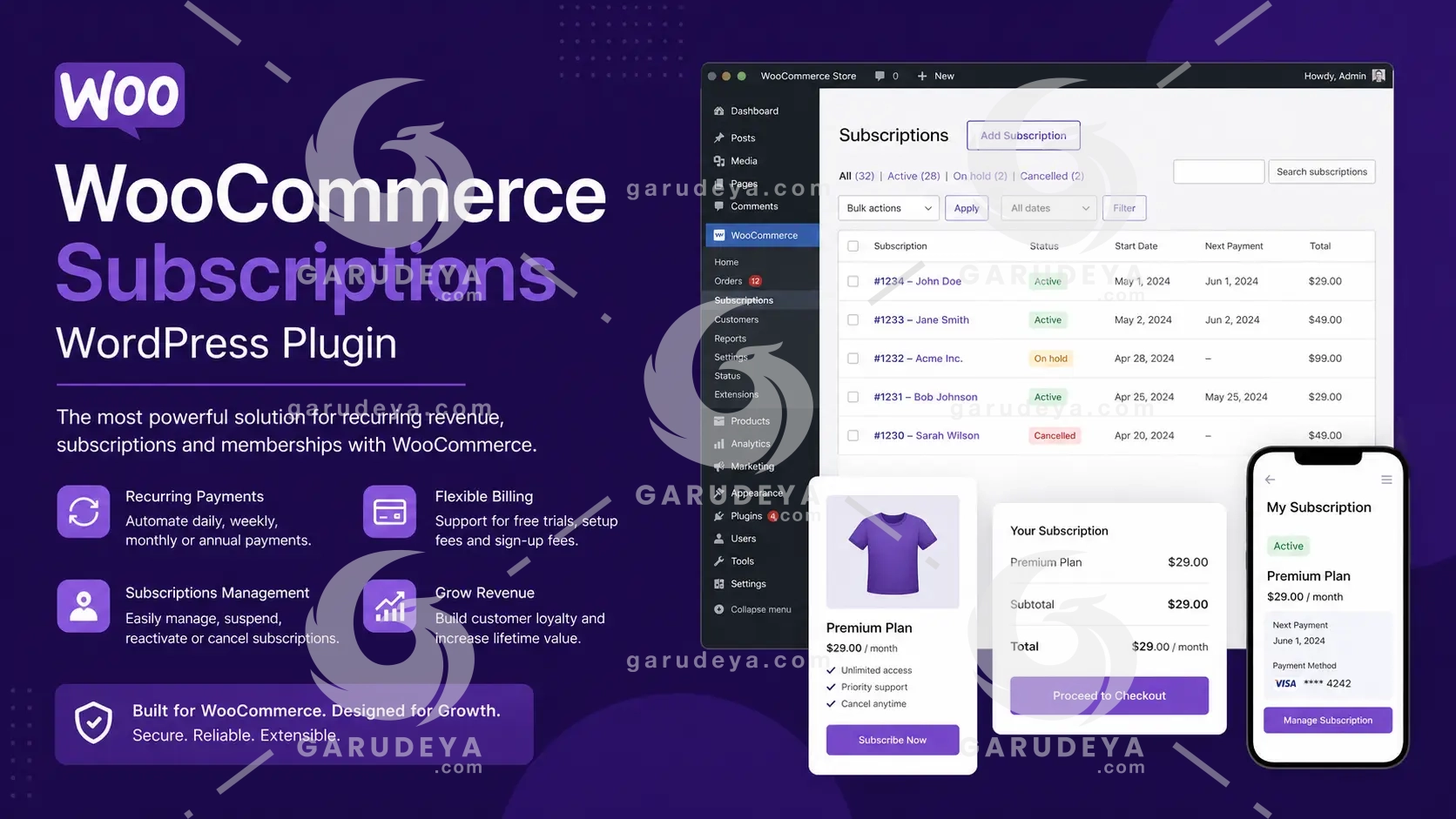
WooCommerce Subscriptions is the ultimate WordPress plugin for store owners who are tired of chasing one-time sales and want to build a reliable, recurring income stream. If you have ever stared at your dashboard wondering whether next month will be profitable, you already know the anxiety that comes with unpredictable revenue. Imagine waking up every morning knowing exactly how much money is flowing into your store, without lifting a finger for every individual transaction. That is precisely the freedom this powerful WooCommerce extension delivers, and it starts the moment you install it.
Whether you are running a product-of-the-month club, a weekly service subscription, or a yearly software billing package, this tool transforms the way you do business. Say goodbye to revenue guesswork and hello to consistent, trackable cash flow that grows alongside your customer base.
Why WooCommerce Subscriptions Is the Smarter Way to Run Your Store
Running an online store without a subscription model is like filling a leaky bucket. You work hard to bring in new customers, close the sale, and then start the entire process all over again. WooCommerce Subscriptions plugs that leak by converting one-time purchases into long-term, recurring revenue relationships. You ship the orders, and the payments take care of themselves.
This extension integrates seamlessly with your existing WooCommerce setup, giving you everything you need to launch subscription-based products for both physical and virtual goods. Add a sign-up fee to cover onboarding costs, offer a free trial to lower the barrier for hesitant shoppers, or set expiration periods that keep customers coming back to renew. The flexibility here is genuinely impressive.
Flexible Billing Schedules and Payment Gateway Integration
Multiple Billing Options That Fit Your Business Model
Not every store operates on the same timeline, and WooCommerce Subscriptions understands that. You can set up billing on a weekly, monthly, or annual basis, choosing the schedule that makes the most sense for your products and your customers. This level of flexibility means you can serve a wide variety of subscription types without needing separate tools or workarounds.
Need to align all your customers to the same annual membership renewal date? The renewal synchronization feature has you covered, even allowing you to prorate the first payment so new subscribers are never overcharged.
Seamless Integration With Over 25 Payment Gateways
One of the standout strengths of WooCommerce Subscriptions is its compatibility with more than 25 payment gateways, enabling fully automatic recurring payments without manual intervention. If a payment fails, the plugin supports automatic rebilling so you never lose revenue due to a missed charge. For stores that prefer manual renewal payments, those are supported too, complete with automatic email invoices and receipts that keep everything professional and transparent.
Complete Subscription Management for You and Your Customers
Full Store Owner Control
Through the WooCommerce Edit Subscription screen inside your WordPress admin dashboard, you have complete control over every active subscription. Suspend or cancel a plan, adjust the trial expiration date, add items, modify shipping or fees, and update the recurring total for future payments. You are never locked out of the details that matter most to your business operations.
Detailed Revenue Reports You Can Actually Use
Built-in reporting tools give you a clear picture of recurring revenue, the number of active subscribers, and overall subscription performance. Knowing your numbers means you can plan ahead with confidence, invest in growth strategically, and stop guessing about what next month will bring.
Empowered Subscribers Who Manage Their Own Accounts
Your customers do not want to wait on hold or send emails just to update their shipping address. With the My Account View Subscription page, subscribers can handle their own plans independently, upgrading, downgrading, suspending, or canceling without needing your involvement. They can also update their payment method or shipping address ahead of future renewals. This self-service approach reduces support requests and improves customer satisfaction at the same time.
Advanced Features That Drive Growth and Retention
Variable Subscriptions and Flexible Product Options
WooCommerce Subscriptions lets you create variable subscription products, giving customers the ability to select the plan that suits their lifestyle and budget. You can even allow customers to define their own billing schedule. Products can be downloadable, virtual, or physical, and you can limit subscriptions to one per customer or charge shipping only on the initial order. That kind of granular control makes it easy to design exactly the experience you want to offer.
Upgrade, Downgrade, and Cross-Grade With Ease
Customers change their minds, and their needs evolve over time. Rather than losing a subscriber entirely, give them the option to switch plans. Flexible proration options for recurring amounts, sign-up fees, and subscription lengths mean that switching to a new tier feels fair and straightforward, keeping your customers happy and your retention rates high.
Gift Subscriptions, Coupons, and Multi-Subscription Purchases
Allow shoppers to gift subscriptions to friends and family, expanding your reach to new audiences without extra advertising spend. Subscription-specific coupons let you offer discounts on recurring payments or sign-up fees, giving you a powerful tool for promotions and customer acquisition. Customers can also purchase multiple subscription products in the same transaction, with WooCommerce Subscriptions automatically grouping them to reduce payment gateway fees and simplify future renewals.
Automated Notifications That Keep Everyone Informed
Built-in renewal notifications and automatic customer emails ensure that both you and your subscribers are always in the loop. When a payment is processed, a subscription is renewed, or a plan expires, the right message goes out automatically. No surprises, no confusion, just smooth communication that builds trust and reduces churn.
Start Building Predictable Revenue Today
WooCommerce Subscriptions takes the stress out of growing a sustainable online business. From powerful billing flexibility and gateway integrations to subscriber self-management and detailed reporting, every feature is designed to help you capture more residual revenue with less effort. Whether you are shipping curated product bundles to loyal customers each month or billing clients for ongoing services, this plugin gives you the infrastructure to scale with confidence. Stop relying on unpredictable one-time sales and start building the kind of recurring revenue that lets your business thrive.
How to Download this item at Garudeya.com
The method is quite easy, click this link, you will be directed to this item download tutorial
> We do not offer any additional services from authors, such as product customization or license keys. We are not affiliated or associated in any way with any third party developers or trademark owners. > This product is intended for testing purposes only. To respect the original developer, we still recommend you to purchase the original product through the official sales site. > 100% Clean Files & Free From Viruses & Free From Malware > Unlimited Use > Instant Download
User Reviews
0.0out of 5
★★★★★
0
★★★★★
0
★★★★★
0
★★★★★
0
★★★★★
0
Write a review
There are no reviews yet.
Be the first to review “WooCommerce Subscriptions” Cancel reply





User Reviews
There are no reviews yet.