JetCompareWishlist For Elementor WordPress Plugin – JetCompareWishlist
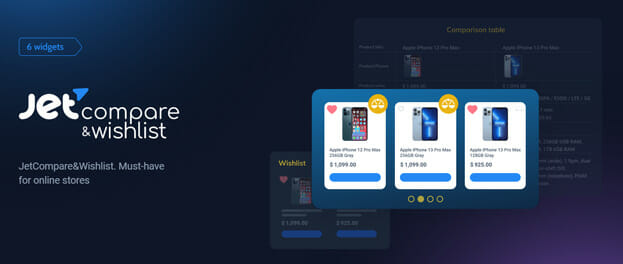
If you run an online store, you already know how often customers hesitate before buying. They open multiple tabs, compare specs in their heads, and promise to “come back later.” Most of them never do. JetCompareWishlist For Elementor WordPress Plugin powered by JetCompareWishlist changes that story by giving your visitors the tools they need to compare products, save favorites, and make confident decisions in one seamless WooCommerce experience.
Imagine your shoppers being able to build their own product comparison table, create personalized wishlists, and instantly see how items stack up against each other. No confusion. No friction. Just clarity. With JetCompareWishlist, you transform browsing into engagement and engagement into conversions. Designed for WordPress and fully integrated with Elementor, this powerful plugin helps you create a smarter, more user-friendly eCommerce website that keeps customers coming back.
Whether you sell electronics, fashion, digital products, or services, JetCompareWishlist empowers your WooCommerce store with advanced product comparison and wishlist functionality that feels intuitive and fast. It is not just about features. It is about giving your customers confidence and giving your business measurable growth.
Why JetCompareWishlist Is a Must-Have for Online Stores
Compare Products by Any Data
With JetCompareWishlist, you decide how products should be compared. Define custom attributes, technical specifications, pricing, ratings, or any WooCommerce product data. This flexibility makes it ideal for stores with detailed catalogs such as electronics, furniture, software, or subscription services.
Custom Comparison Parameters for Better Buying Decisions
Instead of overwhelming customers with scattered information, JetCompareWishlist organizes product attributes into a structured comparison table. Visitors can instantly see differences and similarities, which reduces doubt and speeds up purchasing decisions. When users can compare products by features, price, SKU, stock status, or custom fields, they feel informed and confident. That confidence leads directly to higher conversion rates.
Display Well-Organized Wishlists
Online shoppers love saving products for later. JetCompareWishlist allows you to design and style beautiful, well-structured wishlists that align perfectly with your brand identity.
Fully Customizable Wishlist Layouts with Elementor
Because JetCompareWishlist For Elementor WordPress Plugin is built specifically for Elementor page builder, you can visually customize every wishlist page. Adjust typography, colors, buttons, grid layouts, and product elements without touching a line of code. This ensures your wishlist functionality blends seamlessly into your WordPress theme and strengthens your brand image.
Add Compare and Wishlist Buttons Anywhere
Make interaction effortless by placing Compare and Wishlist buttons exactly where your customers expect them.
One-Click Add to Compare or Wishlist
With JetCompareWishlist, visitors can add products to a wishlist or comparison list in one click. Add buttons to product cards, single product pages, shop archives, or custom templates. The easier it is to interact with products, the longer users stay on your site and the more likely they are to convert.
Show the Compare and Wishlist Count
Social proof and visibility matter in eCommerce. Let customers instantly see how many items they have added.
Real-Time Product Count Display
JetCompareWishlist includes dynamic count buttons that display the number of products added to compare or wishlist lists. This subtle feature keeps users engaged and encourages them to review their saved items before leaving your site. It also improves usability, especially on large WooCommerce stores with extensive catalogs.
Powerful Widgets to Supercharge Your Store
JetCompareWishlist For Elementor WordPress Plugin comes with a complete set of dedicated Elementor widgets that bring advanced comparison and wishlist functionality to your WordPress website.
Wishlist Widget
Enable customers to create personal collections of desired products in one centralized wishlist page. The Wishlist Widget displays selected products in a clean, organized layout, making it easy for users to revisit and purchase saved items. For seasonal campaigns, gift guides, or high-ticket products, this feature is invaluable.
Wishlist Count Button Widget
Keep the number of liked products visible at all times. The Wishlist Count Button Widget shows a live counter while customers browse other categories. This constant reminder subtly guides users back to their saved products, increasing return visits and completed purchases.
Wishlist Button Widget
The Wishlist Button Widget allows shoppers to add products to their wishlist instantly. You can fully customize its design, alignment, and behavior to match your WooCommerce store layout. With JetCompareWishlist, every interaction feels natural and intuitive.
Compare Widget
The Compare Widget enables users to build detailed comparison lists displayed in a structured comparison table. Include all relevant product data such as attributes, custom fields, pricing, ratings, and descriptions. JetCompareWishlist makes complex product evaluation simple and visually clear.
Compare Count Button Widget
Display the number of products added to comparison lists with the Compare Count Button Widget. This feature enhances usability and keeps shoppers aware of their selections, encouraging deeper engagement with your store.
Compare Button Widget
Add the Compare Button Widget to any custom Elementor template and allow users to add products to comparison lists in a single click. JetCompareWishlist ensures smooth functionality across product pages, archives, and landing pages.
Built for Elementor, Optimized for WooCommerce, Powered by JetCompareWishlist
JetCompareWishlist is fully compatible with WordPress, WooCommerce, and Elementor, making it a perfect solution for modern eCommerce websites. It enhances user experience, improves product discovery, and supports conversion rate optimization strategies.
By combining advanced product comparison, customizable wishlist systems, and dynamic count buttons, JetCompareWishlist For Elementor WordPress Plugin helps you:
Increase customer engagement
Reduce cart abandonment
Improve on-site navigation
Boost conversion rates
Strengthen brand trust
If you want your WooCommerce store to feel professional, interactive, and conversion-focused, JetCompareWishlist is the smart investment. Give your customers the clarity they crave and the tools they need to choose confidently.
Transform your online store today with JetCompareWishlist For Elementor WordPress Plugin and turn casual visitors into loyal buyers.
How to Download this item at Garudeya.com
The method is quite easy, click this link, you will be directed to this item download tutorial
> We do not offer any additional services from authors, such as product customization or license keys. We are not affiliated or associated in any way with any third party developers or trademark owners. > This product is intended for testing purposes only. To respect the original developer, we still recommend you to purchase the original product through the official sales site. > 100% Clean Files & Free From Viruses & Free From Malware > Unlimited Use > Instant Download
User Reviews
0.0out of 5
★★★★★
0
★★★★★
0
★★★★★
0
★★★★★
0
★★★★★
0
Write a review
There are no reviews yet.
Be the first to review “JetCompareWishlist For Elementor WordPress Plugin” Cancel reply





User Reviews
There are no reviews yet.