WP Adminify Pro: The Ultimate Powerhouse Toolkit for Your WordPress Dashboard
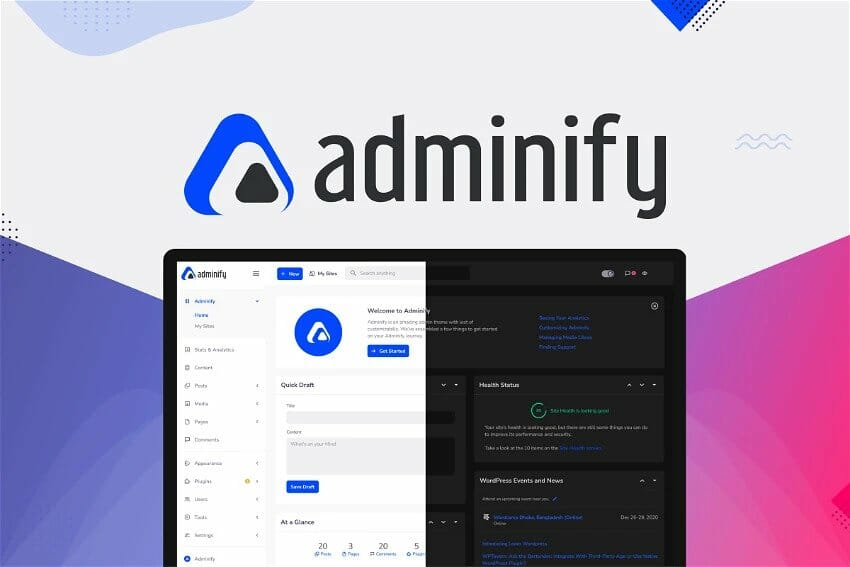
WP Adminify Pro is the all-in-one WordPress dashboard toolkit that transforms a cluttered, generic admin panel into a sleek, branded, and highly productive workspace, built specifically for agencies, developers, and WordPress power users who demand more from their backend experience.
If you have ever opened your WordPress admin panel and felt overwhelmed by a disorganized menu, cluttered notifications, irrelevant widgets, and a sea of settings that slow you down, you are not alone. Thousands of WordPress site owners face the same frustration every single day. The default WordPress dashboard was never designed with your brand, your clients, or your workflow in mind. It was built as a one-size-fits-all solution, and as a result, it fits almost no one perfectly.
That is exactly the problem WP Adminify Pro was created to solve.
Imagine logging into your WordPress admin area and being greeted by a clean, beautifully branded interface that feels like it was built just for you. Your logo sits where the WordPress branding used to be. The menu only shows what matters. Your clients stop calling with confused questions because everything in their dashboard is clear, simple, and purposeful. Your team works faster because distractions have been eliminated. Your entire WordPress admin experience now reflects the professional standard your brand represents.
This is not just a plugin. This is a complete WordPress admin customization system that replaces the need for over 50 separate tools with a single, lightweight, and well-organized solution. Since its launch in 2021, more than 7,000 WordPress site owners have relied on WP Adminify to build custom dashboards tailored to their brand, their workflow, and their clients. Now, with the Pro version, you unlock the full power of that system, every module, every advanced setting, every professional-grade feature, all in one place.
What Makes WP Adminify Pro the Go-To WordPress Admin Plugin?
WP Adminify Pro is not another plugin that does one thing well and leaves you hunting for another tool to fill the gaps. It is a comprehensive WordPress admin panel customization toolkit that covers everything from visual design and menu management to security hardening, performance optimization, and developer-level code injection. Let’s walk through what you get inside.
1. WordPress Dashboard Customization: Your Brand, Your Rules
Build a custom WordPress dashboard that your clients and team will actually enjoy using.
The first impression of your WordPress admin area matters more than most people realize. With WP Adminify Pro, you can design a personalized WordPress custom dashboard that reflects your brand identity from the very first login. Choose your own color schemes, match the admin panel to your brand colors in under two minutes, and apply custom backgrounds, fonts, and visual styles that create a consistent and professional look throughout the entire backend.
Responsive Admin Layouts for Every Device
Every layout in WP Adminify Pro has been tested across desktop, tablet, and mobile admin access, so your team and clients get a consistent experience no matter how they connect. Whether you are managing a site from the office or reviewing content from a mobile device, the interface adapts intelligently without breaking the layout.
Light Mode and Dark Mode Switcher
Toggle between light and dark interface themes with a single click, or let the system automatically switch based on the user’s operating system preference. This small but powerful feature dramatically improves comfort during long working sessions and gives your admin area a modern, premium feel.
This is the WordPress admin customization approach that agencies use to deliver polished, branded dashboards to their clients without writing a single line of code.
2. Admin Menu Editor: Take Full Control of Your Sidebar Navigation
Drag, drop, rename, and restructure your WordPress admin menu without touching any code.
The admin menu editor in WP Adminify Pro gives you complete drag-and-drop control over every item in the WordPress admin sidebar. Whether you need to rename menu items to match your brand language, reorder navigation links to match your team’s workflow, or hide entire sections from specific user roles, this feature puts you fully in charge.
Role-Based Menu Visibility
Set menu visibility on a per-role basis. Show certain sections only to editors, restrict others to administrators, and create a streamlined navigation experience for authors or subscribers who only need access to specific areas. This is particularly valuable for client sites where a clean, minimal admin sidebar reduces confusion and support requests.
Custom Icons, Links, and Separators
Replace default icons with Dashicons, FontAwesome icons, or your own custom SVGs. Add custom links and visual separators to create grouped menu sections, which is especially useful for complex multi-plugin setups where organization is critical.
WP Adminify handles both the main sidebar menu and the WordPress admin toolbar through a single, unified interface, making it the most efficient admin menu editor available for WordPress today.
3. Productivity-Boosting Features: Work Smarter, Not Harder
Eliminate repetitive tasks and reclaim your time with a dashboard designed around efficiency.
WP Adminify Pro includes a suite of productivity tools that streamline your daily WordPress workflow. Sortable post types, taxonomies, and media files give you instant visual control over how content is organized. Custom admin column management lets you see exactly the data you need at a glance without digging through individual post settings.
One-Click Content Duplication
Clone any post, page, or custom post type instantly with the built-in content duplication tool. All taxonomies, custom fields, and layout settings are preserved, so you can replicate complex pages without manually recreating everything from scratch.
Clean Up Your Dashboard Interface
Remove unwanted dashboard widgets and sidebar elements that you never use. Adjust RSS feed display settings, reduce visual noise, and build an admin environment where your team can focus entirely on the work that matters.
4. Enhanced Admin Security: Protect Your WordPress Backend
Advanced security controls that go beyond what most standalone plugins offer.
Security is a top priority for any WordPress site, and WP Adminify Pro addresses it with a targeted set of backend protection features. Role-based login and logout redirections ensure users are sent to the right destination after authentication, reducing unauthorized access to sensitive admin areas.
Header Security and Feed Control
Hide vulnerable elements using header security settings, control feed link exposure, and enable or disable the WordPress REST API based on your specific needs. These controls give you meaningful protection against common WordPress security vulnerabilities without requiring separate security plugins.
Spam and Malware Prevention
Disable the comment box entirely to eliminate spam messages and malicious link injection. Combine this with post and archive redirection options to keep unauthorized users away from content they should not access. You can also set a custom Gravatar for a more polished and branded user profile appearance.
Fine-tune your WordPress admin dashboard for speed and responsiveness with minimal effort.
WP Adminify Pro includes a focused set of performance optimization tools designed to make your WordPress backend run faster and more efficiently. One-click performance enhancements let you apply smart defaults without deep technical knowledge. Control embed loading, manage frontend script and style output for the Gutenberg block editor, and adjust browser cache expiration settings to improve overall load times.
Gutenberg Control and Script Management
Not every site needs the Gutenberg editor on every page. WP Adminify Pro lets you disable Gutenberg across your entire site or control exactly where it loads. Manage frontend scripts associated with the block editor to reduce unnecessary code from loading on pages where it is not needed.
Heartbeat API Control
Take command of the WordPress Heartbeat API to reduce unnecessary server requests. By managing how frequently the Heartbeat API runs in the dashboard and post editor, you reduce server load and improve the overall responsiveness of your WordPress admin area, especially on shared hosting environments.
6. Code Snippet Manager: Advanced Customization for Developers
Insert custom CSS, JavaScript, and code snippets without editing theme files or creating a child theme.
WP Adminify Pro includes a built-in code snippet manager that gives developers and advanced users a clean, organized way to add custom code to both the frontend and backend of a WordPress site. Add custom CSS and JavaScript for the admin panel or the public-facing site, manage multiple snippets independently, and assign device-specific display conditions so your code only loads where it is needed.
Multi-Snippet Control
Organize and toggle individual snippets on and off without deleting them. This makes testing and iterating on custom functionality much faster and safer than editing theme files directly.
7. White Label Dashboard: Perfect for Agencies and Freelancers
Deliver a fully branded WordPress experience to every client without revealing the tools behind it.
If you manage client websites, the white label feature in WP Adminify Pro is one of the most valuable tools in your toolkit. Replace all default WordPress branding with your own agency logo, business name, and custom colors. Control the admin footer text, remove the default “Howdy” greeting from the top bar, and replace it with something that fits your brand voice.
Custom Login Page Builder
Create a fully customized WordPress login page that reflects your brand from the very first interaction. Control the login URL to add an extra layer of security and prevent bots from targeting the default login path.
User Role and Menu Management for Client Sites
Combine white labeling with role-based menu control and custom dashboard management to deliver a client admin experience that is clean, on-brand, and purpose-built for their needs. Your clients see exactly what they need to see and nothing else.
8. Custom Admin Pages, Widgets, and Notification Control
Build a focused, organized WordPress admin area that keeps everyone on track.
WP Adminify Pro lets you design custom admin pages to organize links, content, and resources in a structured layout that works for your entire team. Compatible with all major page builders, these custom pages support role-based display control so the right people see the right content.
Disable Admin Notices
Remove distracting plugin notifications, WordPress update alerts, and welcome panels with a single click. Build a distraction-free admin environment that lets your team focus on actual work instead of dismissing irrelevant messages.
Custom Dashboard Widgets
Add your own branded dashboard widgets that share updates, embed tutorial videos, or provide quick-access shortcuts. Fully compatible with the Classic Editor and shortcodes, these widgets make it easy to deliver important information directly inside the admin panel.
9. Media Folder, Post Duplicator, and Post Type Order
Organize, duplicate, and reorder your content with precision and speed.
Managing media files in a large WordPress library can be a nightmare without the right tools. WP Adminify Pro includes a media folder system that supports unlimited folder and subfolder creation across all post types, along with sticky scrolling to keep navigation in view as you browse.
The post duplicator feature works with every page builder, supports all post types, and includes WooCommerce product support, making it an essential tool for store owners and content-heavy sites alike.
Finally, the post type order system lets you reorder any content type inside your WordPress admin, including custom post types built with ACF or Pods. Enable or disable sorting per post type, and apply custom ordering to your media library as well.
Why WP Adminify Pro Is the Smartest Investment for Your WordPress Workflow
Every feature inside WP Adminify Pro was built with a clear purpose: to give WordPress professionals a single, reliable tool that handles dashboard customization, security, performance, branding, and productivity without requiring a stack of separate plugins.
You save money by replacing dozens of individual tools. You save time by managing everything from one unified interface. You deliver better results to your clients with branded, organized, and distraction-free admin dashboards. And you build a more professional reputation as someone who takes the entire WordPress experience seriously, not just the frontend.
WP Adminify Pro is the WordPress admin customization plugin that agencies, freelancers, developers, and power users have been waiting for. Get started today and experience the difference a properly built WordPress dashboard can make.
How to Download this item at Garudeya.com
The method is quite easy, click this link, you will be directed to this item download tutorial
> We do not offer any additional services from authors, such as product customization or license keys. We are not affiliated or associated in any way with any third party developers or trademark owners. > This product is intended for testing purposes only. To respect the original developer, we still recommend you to purchase the original product through the official sales site. > 100% Clean Files & Free From Viruses & Free From Malware > Unlimited Use > Instant Download