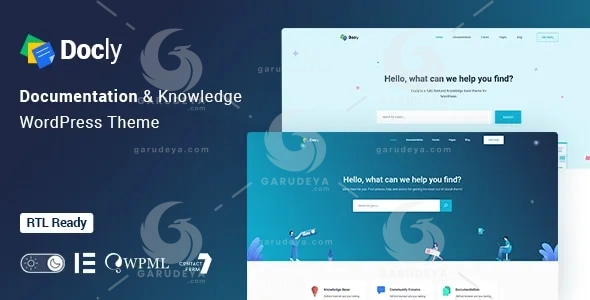
Docly – Documentation And Knowledge Base WordPress Theme with bbPress Helpdesk Forum
Docly – Documentation And Knowledge Base WordPress Theme with bbPress Helpdesk Forum is more than just a WordPress theme—it is the foundation for clarity, confidence, and trust between you and your users. If you have ever felt frustrated watching customers struggle to understand your product, repeatedly submit the same support tickets, or abandon your software because the documentation was confusing or incomplete, Docly was created precisely to solve that problem.
Great products deserve great documentation. In today’s competitive digital landscape, users expect instant answers, intuitive navigation, and beautifully presented knowledge bases that guide them step by step. Docly transforms complex information into an engaging, readable, and interactive experience. It empowers SaaS companies, developers, startups, agencies, and product creators to communicate their value clearly while reducing support costs and increasing customer satisfaction.
Imagine launching your product with confidence, knowing that every feature, API endpoint, plugin setup, or framework instruction is documented in a way that users genuinely enjoy reading. With Docly, your documentation becomes a powerful extension of your brand—professional, modern, and user-focused. Whether you are building a helpdesk portal, a developer documentation hub, or a comprehensive knowledge base website, this documentation WordPress theme gives you the tools to create an experience that feels effortless for both you and your audience.
Docly speaks directly to one of the deepest needs of product owners: the desire to educate users without overwhelming them. By combining performance, usability, and design excellence, Docly bridges the gap between technical accuracy and human-friendly presentation. The result is a documentation and knowledge base WordPress theme that not only looks beautiful but also works flawlessly across devices, search engines, and user journeys.
Key Features & Benefits
Docly is a powerful, responsive, and high-performance online documentation WordPress theme designed to help you build professional documentation faster and smarter. Every feature is crafted to meet real-world documentation challenges while improving readability, engagement, and accessibility.
Purpose-Built for Product Documentation
Docly allows you to effectively create documentation for APIs, frameworks, WordPress plugins, software products, templates, and digital tools of any complexity. Its structured layouts, semantic coding, and modular components ensure that even the most technical content feels organized and approachable. This makes Docly an ideal documentation theme for developers and non-developers alike.
Responsive & Mobile-Friendly Experience
With a fully responsive layout, Docly ensures your documentation looks flawless on desktops, laptops, tablets, and smartphones. Users can access your knowledge base anytime, anywhere, without sacrificing readability or usability. This mobile-first documentation experience increases engagement and keeps users connected to your product ecosystem.
SEO Optimized & Search Engine Friendly
Docly follows best SEO practices with clean, search engine optimized code and W3C-compliant standards. This means your documentation pages can rank higher on search engines, helping users find answers organically. From structured content to fast-loading pages, Docly supports your documentation SEO strategy from day one.
WooCommerce Integration for Monetization
Docly is fully WooCommerce integrated, allowing you to sell documentation-based products, premium knowledge base access, digital downloads, or support packages seamlessly. This makes Docly a powerful choice for businesses looking to monetize their expertise while maintaining a professional documentation platform.
bbPress Helpdesk Forum Compatibility
With bbPress support, Docly enables you to create an interactive helpdesk forum where users can ask questions, share insights, and help one another. This community-driven support system reduces workload while improving user trust and engagement.
Dark & Light Mode Switcher
Cater to every user’s preference with an elegant dark and light mode switcher. This feature enhances readability, reduces eye strain, and gives your documentation website a modern, user-centric feel—especially important for developers who spend long hours reading documentation.
Gutenberg Optimized Editing
Docly is fully optimized for the WordPress Gutenberg editor, allowing you to build documentation pages visually with blocks. This simplifies content creation, reduces development time, and gives you complete design flexibility without touching code.
WPML & RTL Compatibility
Reach a global audience with full WPML and RTL language support. Docly makes it easy to translate your documentation into multiple languages while maintaining layout integrity, making it ideal for international products and diverse user bases.
GDPR Ready & Privacy Focused
Docly is GDPR compliant, ensuring your documentation website respects user privacy and data protection regulations. This builds credibility and trust, especially for businesses operating in regulated markets.
Advanced Readability Tools
Docly enhances user experience with font size switchers, full-width and boxed layouts, sticky and non-sticky headers, and directory indicators. These features ensure users can customize how they read content, improving comprehension and reducing bounce rates.
Interactive Documentation Elements
Make your documentation engaging with dynamic tools such as:
Article tables of contents
Footnotes for references
Page preview tooltips
Conditional content
Image hotspots for visual explanations
These elements transform static documentation into an interactive learning environment that keeps users engaged longer.
Sticky Sidebar & Smart Navigation
Docly includes sticky sidebars, file tree navigation, and directory indicators that help users understand where they are and where to go next. This intuitive navigation structure minimizes frustration and maximizes efficiency.
Syntax Highlighter for Developers
Perfect for technical documentation, Docly includes syntax highlighting for code snippets. This ensures clean, readable code presentation for APIs, frameworks, and software instructions, making it a favorite among developer-focused documentation themes.
Rich Content Components
Docly comes packed with modern UI elements such as tabs, accordions, alerts, notes, tooltips, carousels, lightboxes, and property tables. These components help break down complex information into digestible sections, improving knowledge retention.
Article Feedback System
Understand your users better with built-in article feedback options. This allows readers to rate documentation usefulness, helping you continuously improve content quality and address knowledge gaps.
Mailchimp Integration
Grow your audience effortlessly with Mailchimp integration. Collect emails, send updates, and keep users informed about new documentation, features, or product releases directly from your knowledge base website.
Bootstrap 4 Framework & Modern Design
Built on the Bootstrap 4 responsive framework, Docly delivers a unique, modern style that feels clean and professional. Its layout flexibility ensures your documentation reflects your brand identity while remaining user-focused.
Cross-Browser Compatibility & Clean Code
Docly supports all modern browsers and includes well-commented, 100% valid semantic code. This ensures stability, scalability, and easy customization for developers who want full control over their documentation platform.
Easy Customization & Scalability
Whether you are launching a startup knowledge base or managing enterprise-level documentation, Docly scales with your needs. Its easy customization options allow you to adapt layouts, colors, and components without complexity.
Why Choose Docly?
Docly – Documentation And Knowledge Base WordPress Theme with bbPress Helpdesk Forum is the ultimate solution for anyone serious about creating professional, user-friendly, and SEO-optimized documentation. It reduces support requests, enhances user satisfaction, and strengthens your brand’s authority—all while saving time and development effort.
If your goal is to turn documentation into a competitive advantage rather than an afterthought, Docly is the WordPress documentation theme that delivers clarity, performance, and results.
How to Download this item at Garudeya.com
The method is quite easy, click this link, you will be directed to this item download tutorial
> We do not offer any additional services from authors, such as product customization or license keys. We are not affiliated or associated in any way with any third party developers or trademark owners. > This product is intended for testing purposes only. To respect the original developer, we still recommend you to purchase the original product through the official sales site. > 100% Clean Files & Free From Viruses & Free From Malware > Unlimited Use > Instant Download
User Reviews
0.0out of 5
★★★★★
0
★★★★★
0
★★★★★
0
★★★★★
0
★★★★★
0
Write a review
There are no reviews yet.
Be the first to review “Docly – Documentation And Knowledge Base WordPress Theme with bbPress Helpdesk Forum” Cancel reply





User Reviews
There are no reviews yet.